Three steps from Patient Presentation to Structured Plan
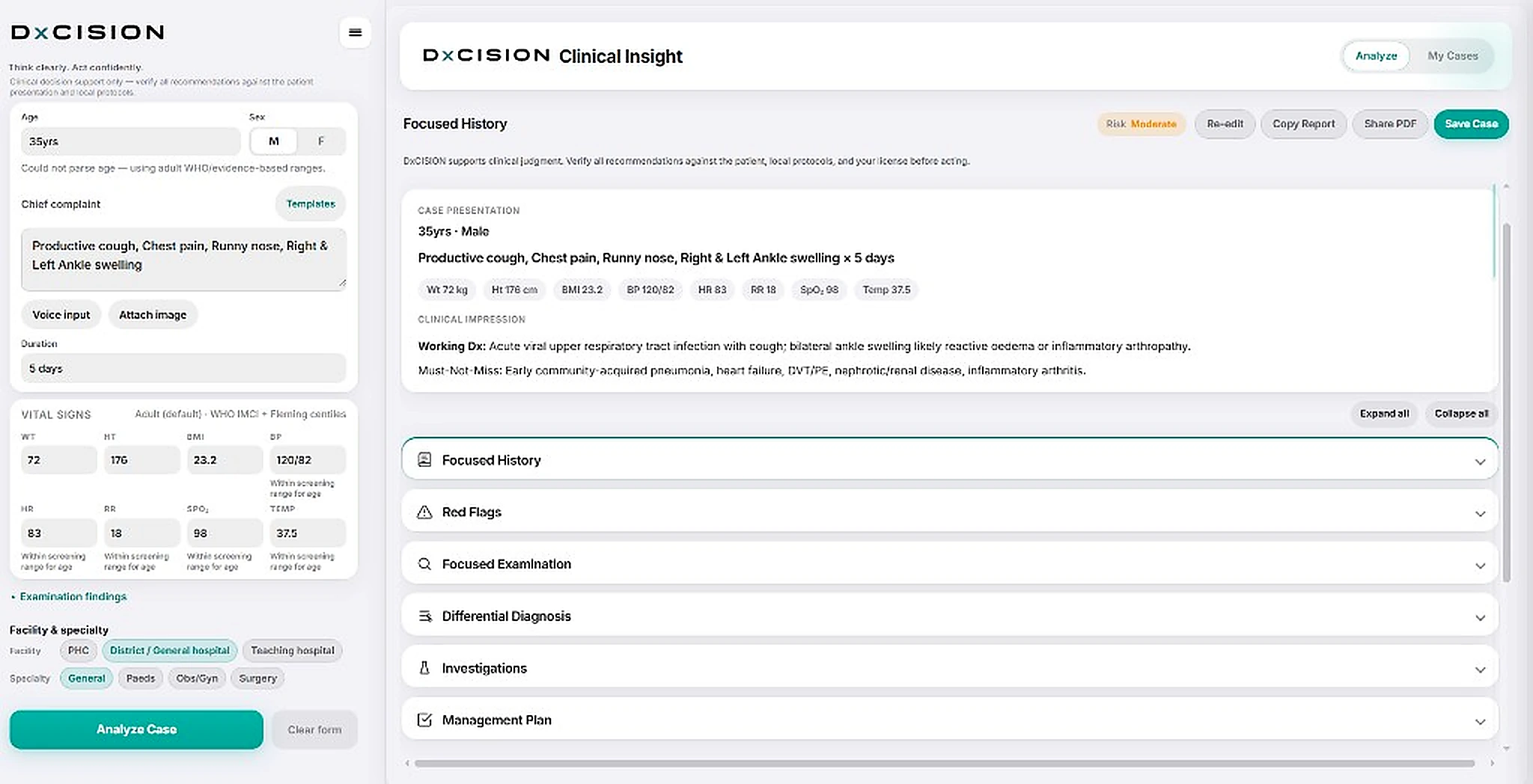
- Intake Enter the Patient Age, Sex, Presenting Complaint, Duration, Vitals, and Facility tier
- Analyze Click the Analyze button
- Plan DxCISION returns a Clinical Impression, Focused History Questions, highlight Red Flags, Examinations to perform, suggest Differential Diagnosis, Investigations and a structured Management Plan.
Sample case
A 35 years old male with productive cough, chest pain, and ankle swelling.


Clinical reasoning is medicine’s most valuable skill. Yet under pressure, it’s often the hardest to sustain. Every patient deserves your best clinical reasoning every time.
That’s exactly what DxCISION was built for.
-
Forced clinical workflow
Every case follows the same path: History, examinations, differentials, investigations, then structured plan.
-
Grounded in your intake
Recommendations stay tied to what you entered. It will not invent vitals or findings you did not document.
-
Facility-tier & local practice
Plans respect your setting and local reality, so next steps fit the ward you are actually on.
Designed to enhance clinical decision making not replace your clinical judgement